

SphereOne invoicing lets a workspace bill its own clients, get each invoice signed and keep track of what every customer owes, in the same workspace where the team chats, meets and shares files with them. This guide walks through the whole cycle with one example: Aspen Ridge Labs, a design studio in Denver, billing its client Harbor & Pine Co. Invoicing is on Enterprise, or as an add-on the SphereOne team turns on for your workspace, and workspace admins find it in Settings, under Invoicing.
Invoicing has three sections down the side: Invoices, Customers and Business profile. Start with the last one.
Step 1: Set up your business profile
The business profile is what every invoice prints about you. Each issued invoice keeps a copy of it, so changing the profile later never rewrites an invoice you already sent.
- Business: your legal name, address, email and phone. Replies to invoices and statements come to this email.
- Tax and currency: your tax ID and how you charge tax. Choose India GST (CGST, SGST and IGST), one named tax such as VAT or sales tax with a default rate, or no tax, and pick a default currency.
- Invoices: the prefixes for invoices and credit notes, which must differ, such as INV and CN, and a default item code.
- Payment details: your bank, account number or IBAN, SWIFT, BIC or routing number, and a payment link or ID. They print on every invoice so the client knows where to pay.
- Authorized signatory: the name and designation of the person who signs, and their signature. Upload a scan or draw it on screen; it prints on every invoice you issue from then on.
- Terms printed on every invoice: for example, “Net 30. Pay by ACH or check, quoting the invoice number.”
Step 2: Add your customers
Open Customers. There are three ways in:
- From guests. If the client is already a guest in your workspace, pick them and they become a customer in one click, with their name, email and phone.
- Import. Drop in a CSV. SphereOne reads columns such as Name, Contact name, Email, Phone, Tax ID (GSTIN, VAT number, EIN and similar), Address, City, State, ZIP and Country, offers a sample file, and tells you what was added, what was already there and what needs fixing. Up to 2,000 customers go in at a time.
- Add customer. Fill in the business, tax and location, contact and address details by hand.
For an Indian customer, the GSTIN is checked and sets their state, which decides the GST on their invoices. Elsewhere, the tax number is kept as typed. A customer you no longer bill can be archived; they leave the pickers, and their history stays.
Step 3: Raise the invoice
In Invoices, start a new invoice, or open the customer and start one from their profile. Choose the customer and the currency: any ISO currency, so Aspen Ridge bills Harbor & Pine in US dollars and could bill a client in Berlin in euros. Then add the lines, each with a description, quantity, unit, rate and tax rate, plus an item code (the SAC or HSN code for GST). Set a due date and add a note if you like.
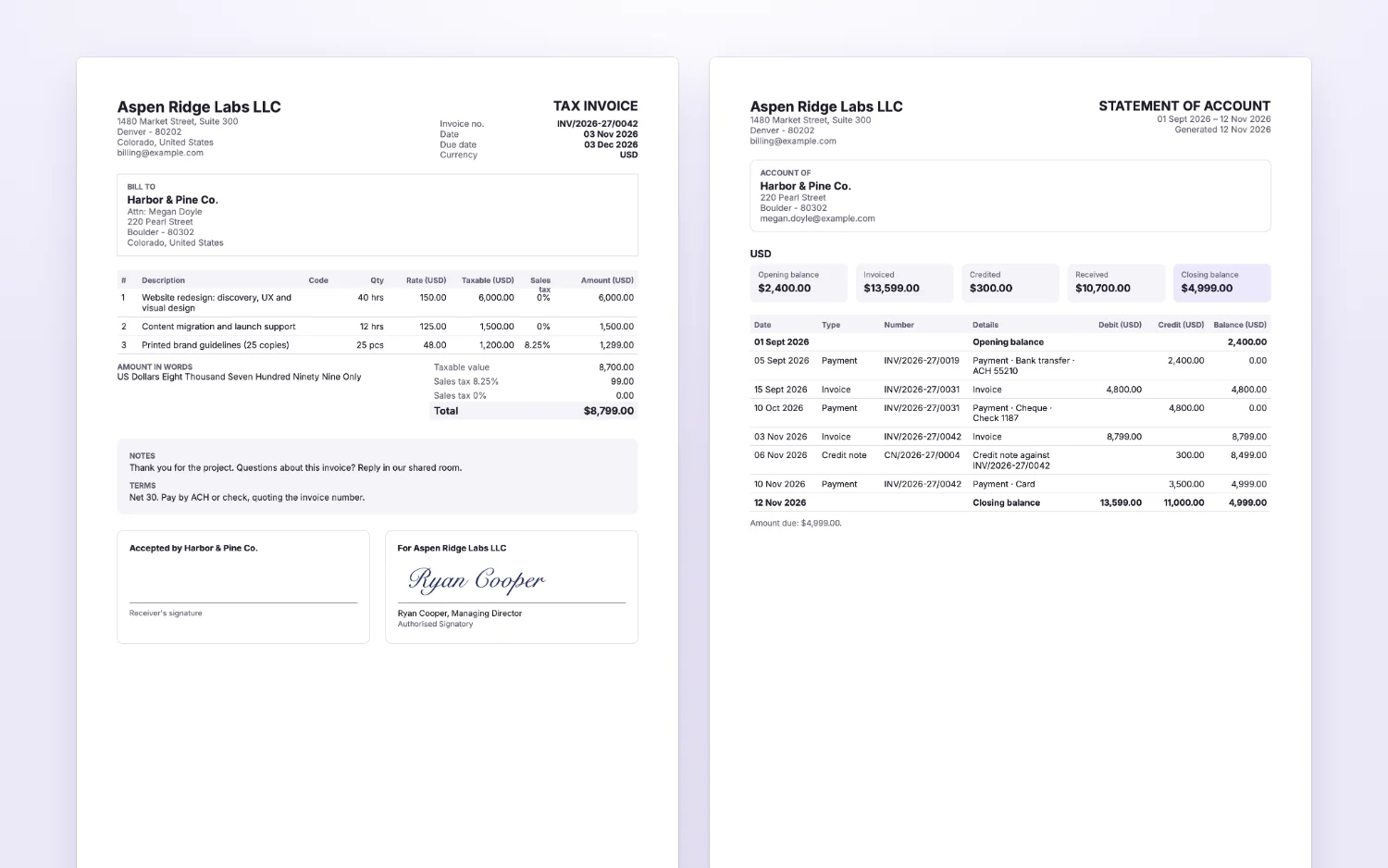
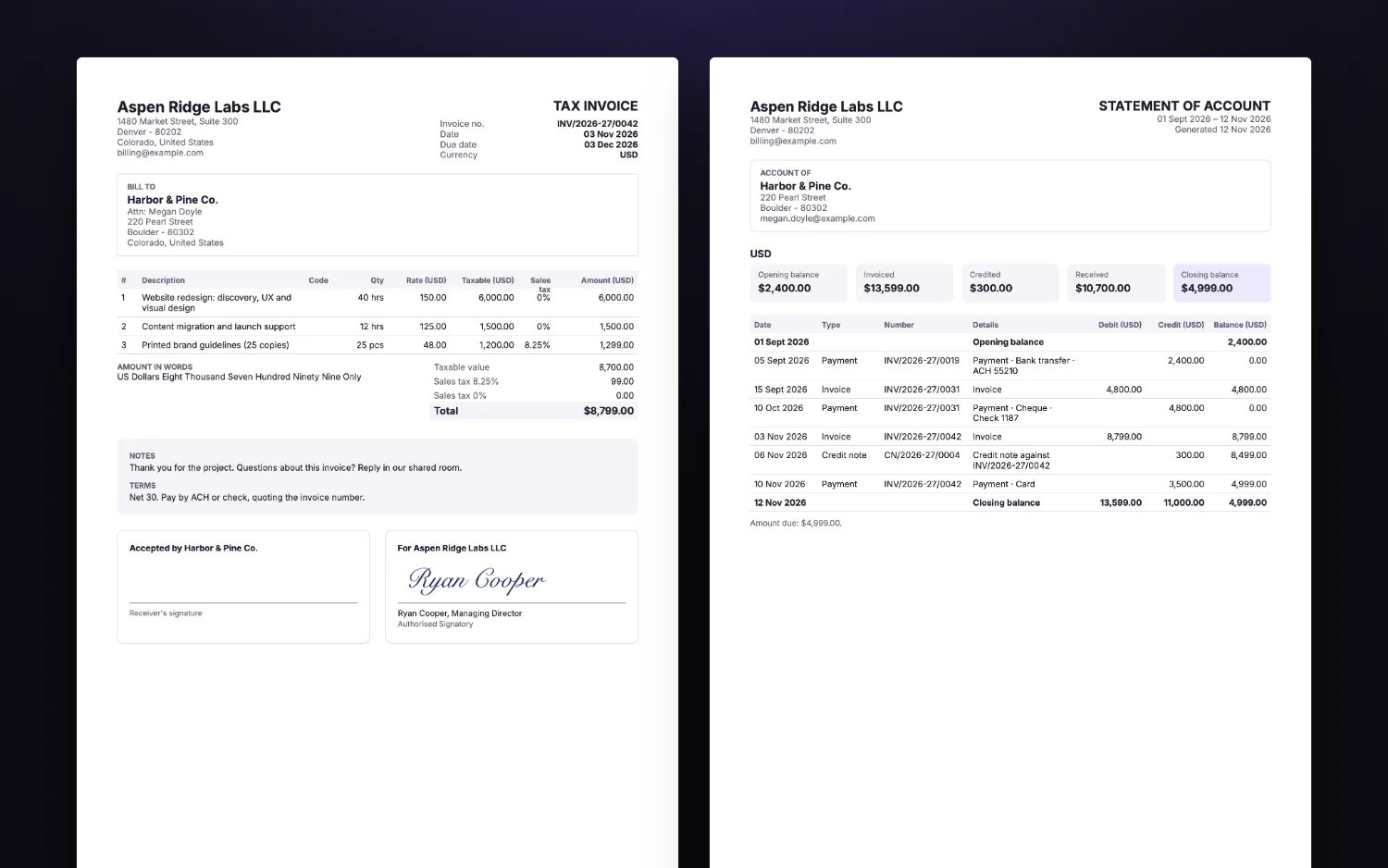
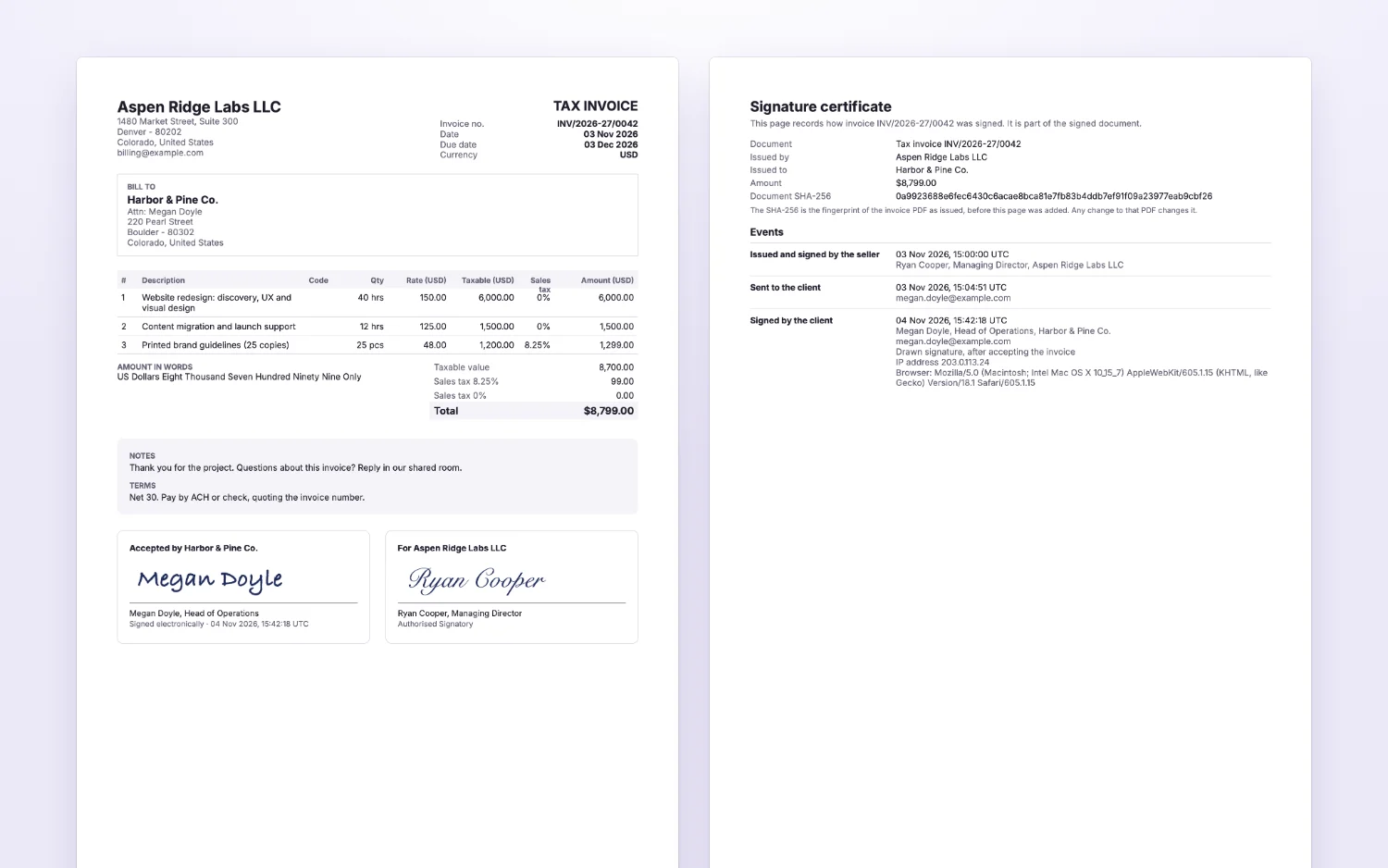
Aspen Ridge’s invoice has three lines: 40 hours of discovery, UX and visual design at $150, 12 hours of content migration at $125, and 25 printed copies of the brand guidelines at $48 with 8.25% sales tax. The taxable value is $8,700.00, the sales tax $99.00 and the total $8,799.00, written out in words on the PDF.
GST in India
With India GST, the place of supply decides the tax. It follows the customer’s state unless you change it. When it is your own state, the invoice charges CGST and SGST; when it is another state or abroad, it charges IGST. Both appear on the PDF with their rates.
VAT, sales tax and other single taxes
Outside India, the invoice carries one named tax, such as VAT, sales tax, another country’s GST or consumption tax, at a rate on each line, and the totals show it rate by rate. Presets give many countries’ usual names and rates, and any rate can be typed. Tick Reverse charge when the client accounts for the tax: none is charged, and the PDF says why. Or choose no tax at all.
Save, then issue
Save draft keeps it editable and unnumbered. Issue invoice gives it the next number in your series and locks it. Aspen Ridge’s is INV/2026-27/0042. Numbers run in a series per financial year from April to March, so an invoice issued in November 2026 falls in the 2026-27 series. Issuing makes the PDF, prints your signatory’s signature and records the seller’s signature against the PDF’s SHA-256 fingerprint.
Step 4: Send it and get it signed
Choose Send invoice. It goes to the customer’s email, or any addresses you type, with an optional message and the PDF attached, and replies come to your business email. The email has a Review and sign button. If Harbor & Pine would rather hear about it in their room, use Copy signing link and paste it there.
Megan Doyle at Harbor & Pine opens the link in her browser; she doesn’t need a SphereOne account. She sees the invoice, its lines and totals, and can open the PDF. To sign, she types her full name, adds her designation and an email for her signed copy, ticks that she has reviewed the invoice and accepts it, and types or draws her signature. The page shows the PDF’s SHA-256, and her signature is recorded against it. If the invoice had changed while the page was open, SphereOne would stop and ask her to review it again.
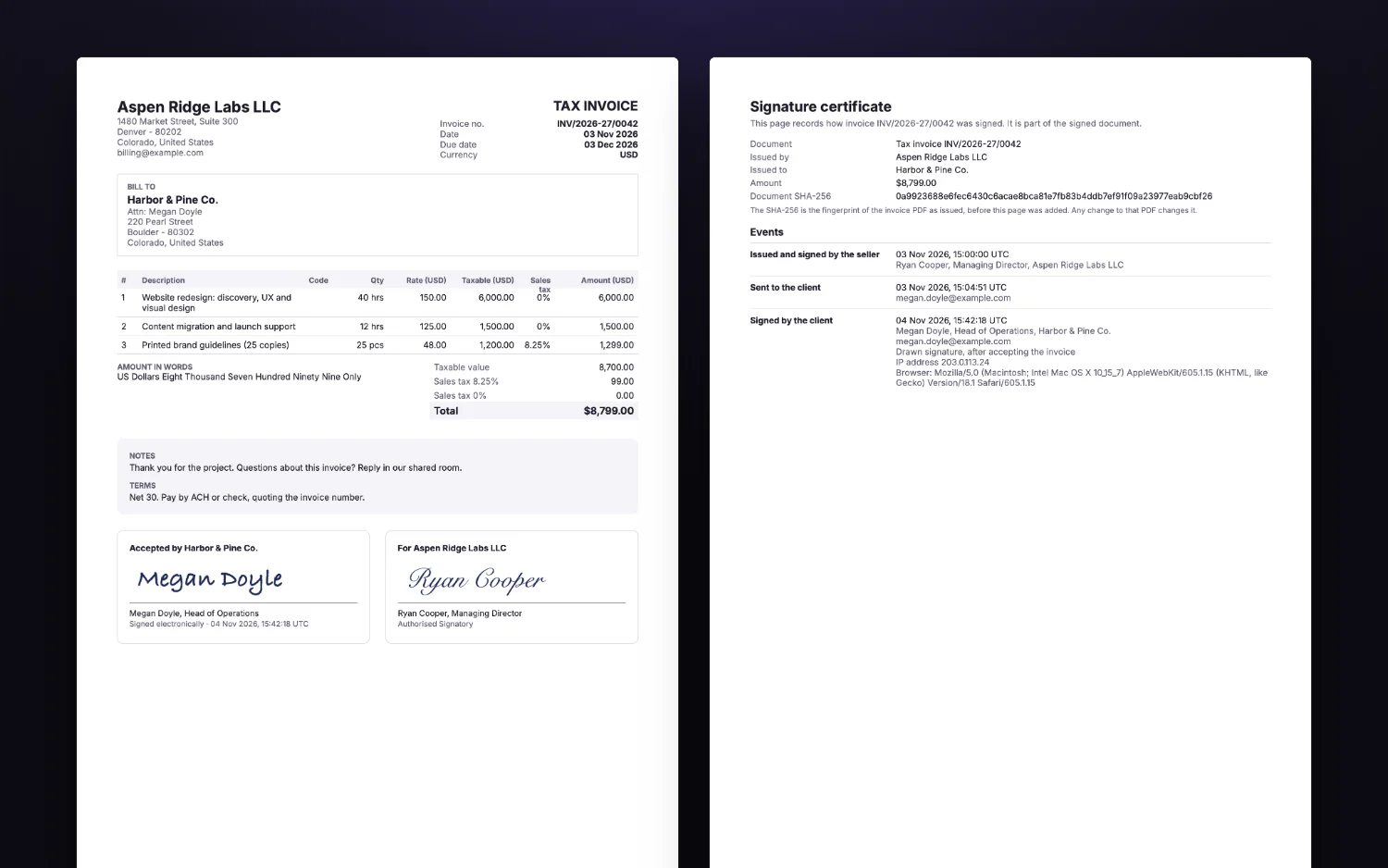
The signed copy fills the client’s signature box and adds a signature certificate as its last page: the invoice, who issued it and to whom, the amount, the SHA-256 of the PDF as issued, and each event to the second, from issue and sending to her signature, with her IP address and browser. It goes to Aspen Ridge’s business email and to Megan, and the invoice shows as signed. The link works for 60 days, and credit notes aren’t sent for signature.
Step 5: Record payments, in part or in full
When money comes in, open the invoice and choose Record payment. The amount starts at the balance due, so a full payment takes one click; change it for a partial one. Add the day it came in, how (bank transfer, UPI, card, cash, check or other) and a reference such as the transfer number.
- A partial payment marks the invoice Part paid and shows what is left. It becomes Paid once nothing is left after credit notes and payments.
- A payment can’t be more than the balance, or dated before the invoice or in the future.
- A payment recorded by mistake is voided with a reason. It stays on the invoice, struck through, and the balance goes back up.
- Signing and paying are separate: a signed invoice still shows its balance, and a paid one can still be signed.
Harbor & Pine pays $3,500 by card on November 10, so the invoice is partially paid.
Step 6: Fix mistakes with a credit note
An issued invoice can’t be edited. If something was wrong, raise a credit note against it. It starts as the whole invoice: remove lines or lower them for a partial credit, and give a reason, which prints on the credit note. Credit notes are numbered in their own series, such as CN/2026-27/0004, and can never credit more than is left on the invoice.
Aspen Ridge finds two hours were billed twice and issues a $300 credit note. After the $3,500 payment, Harbor & Pine owes $4,999.00 on the invoice.
| Date | Entry | Debit | Credit | Balance |
|---|---|---|---|---|
| November 3, 2026 | Invoice INV/2026-27/0042 | $8,799.00 | $8,799.00 | |
| November 6, 2026 | Credit note CN/2026-27/0004 | $300.00 | $8,499.00 | |
| November 10, 2026 | Payment by card | $3,500.00 | $4,999.00 |
You can also cancel an invoice outright if no money has come in and it has no credit notes. A cancelled invoice keeps its number, and its PDF is stamped CANCELLED.
Step 7: Statements, aging and the customer profile
Customers lists everyone with what was raised, billed, received, pending and overdue, the most pending first, and what is owed altogether in each currency above the list. Filter by All, With balance, Overdue or Archived, and download the Aging report in Excel, which groups every open balance by how far past its due date it is.
Open a customer for their whole account: who they are, their totals since the first invoice, how old the pending amount is (not yet due, 1–30, 31–60, 61–90 and 90+ days), every invoice with its balance and how late it is, and every payment.
The Ledger gives a statement of account for any period you choose: the opening balance, each invoice, credit note and payment with the balance after it, and the closing balance, with one table per currency. Download it as an Excel workbook, with sheets for the statement, the invoices with their tax and the payments, or as a PDF, or email it to the customer with a message. Harbor & Pine’s statement from September 1 to November 12, 2026 opens at $2,400.00 and closes at $4,999.00.
A checklist for your first invoice
- Fill in the business profile, including tax, payment details and your signatory.
- Bring in customers from guests, a CSV or by hand.
- Raise the invoice in the right currency and tax, and issue it.
- Send it, or paste the signing link into the client’s room.
- Record each payment as it arrives.
- Use a credit note, never an edit, to correct an issued invoice.
- Send a statement when a customer asks where they stand.
For how this compares with separate tools, read SphereOne invoicing vs QuickBooks, FreshBooks and Zoho Invoice and getting invoices signed vs DocuSign, Adobe Acrobat Sign and Dropbox Sign. The product pages for invoicing and e-signatures have the details by plan.